"It is 1000 times better than paid alternatives. This is the best software."
- Rahul, Legend Polyfoams
Forklifts, test instruments, gauges, and portable machines: checked out by operator, maintained on schedule, and accounted for at every shift change.
Start free. Up to 250 assetsNo credit card required. iOS and Android scanner included
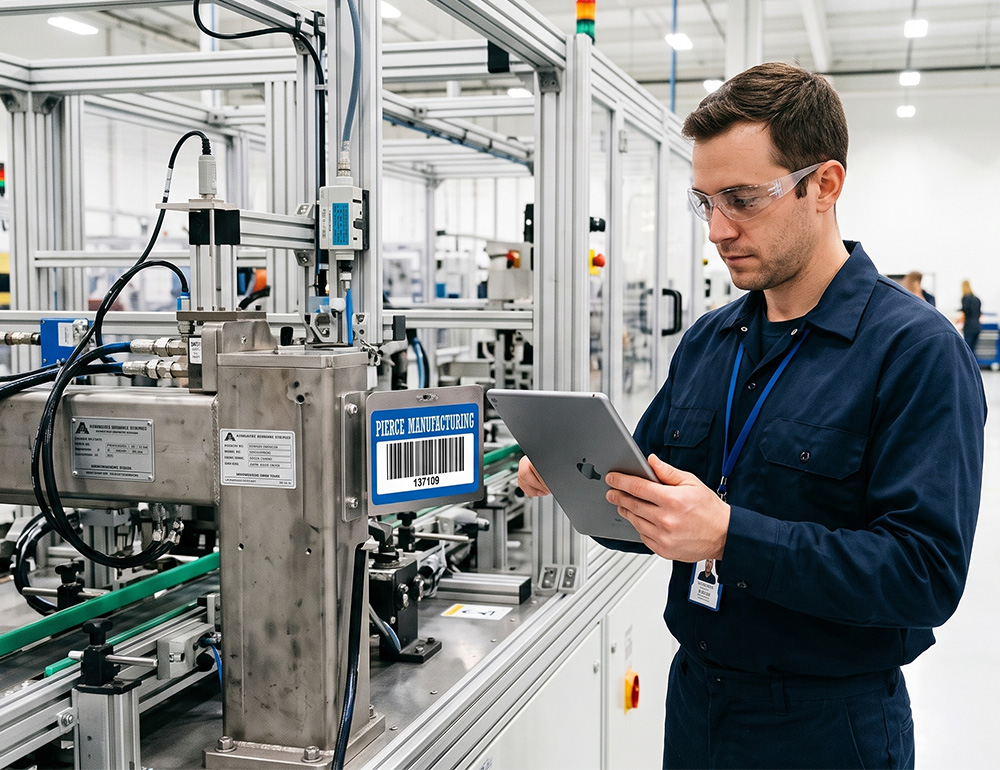
A calibrated gauge leaves the tool crib and vanishes into the plant. When it resurfaces a month later, it's past its calibration date and every measurement it touched is in question.
See which forklifts, test equipment, or tooling run constantly and which sit idle, so capital spending targets real gaps.
Set service intervals by date or usage hours, and get alerts before a machine is due, so unplanned downtime drops.
Know which plant, line, or department has a piece of equipment right now, even when it moves between shifts.
Loan tooling or test equipment between departments with due dates, so borrowed gear actually makes its way back.
Log inspection results and condition notes every time equipment changes hands, building a history you can pull up instantly.
Operators check equipment out or in with a phone camera at the line, no dedicated handheld scanner required.
Sign up for free and get access to check-out, utilization tracking, maintenance scheduling, and reporting across every plant.
Upload a spreadsheet of forklifts, tooling, and test equipment, or add machines one at a time as you go.
Print barcode or QR labels on your office printer, or order durable tags, and apply one to each machine.
Scan the tag to check equipment out to a line, shift, or department, so everyone can see where it went.
Pull uptime, utilization, and maintenance reports by plant or line, and catch downtime patterns before they cost you.
 Check-in / out
Assign an asset to a person, set a due date, and AssetTiger tracks custody automatically. Check it back in when it returns, and everyone can see what's available.
 Maintenance
Schedule preventive maintenance by date or interval. Overdue items surface on your dashboard and in email alerts before they become a problem.
"It is 1000 times better than paid alternatives. This is the best software."
"It is 1000 times better than paid alternatives. This is the best software. Thank you, developers."
Verified reviews from AssetTiger users. Read 271 reviews on Capterra
Helps support Joint Commission recordkeeping: maintenance intervals, calibration certificates, and device location history.
Helps support equipment inspection recordkeeping with maintenance logs and inspection history by asset.
Helps support state equipment reporting with exportable schedules and custody records.
Helps support federal grant recordkeeping: provenance, custody, disposition, and inventory records.
Start free for 30 days, then scale by asset count — never by users. Your whole team is always included.

Rated 4.6 across 271 Capterra reviews · GetApp Category Leaders · GoodFirms Best Asset Tracking · Software Advice Front Runners

There's no strict line. Equipment tracking is typically for higher-value shared items that move between people or locations: medical devices, AV gear, generators, lab instruments, portable machines. Tools are usually hand-carried crew gear; IT assets are laptops, monitors, and licenses. AssetTiger tracks all of them in one platform.
Yes. AssetTiger supports a full location hierarchy covering sites, buildings, floors, and rooms, so you can see where every piece of equipment is at a glance.
Yes. Set PM intervals by date or usage, attach service records, and get email alerts before deadlines.
Yes. Reserve equipment in advance, check it out by department or person, and see current availability. Custody history shows who had what and when.
No. Scan from any iOS or Android phone wherever you have an internet connection. No dedicated handheld required.
Yes. Generate QR codes or barcodes inside AssetTiger and print on any label printer (Brother, Dymo, Zebra, or Avery-template office printers). Or order durable tags from MyAssetTag.com.
Paid plans start at $20/month for up to 500 assets and scale by asset count: $40/month (2,500 assets), $75/month (10,000), $140/month (50,000), and $275/month (250,000). Paid plans include unlimited users at no extra charge.
Yes. AssetTiger offers a 30-day free trial covering up to 250 assets, with no credit card required to start.
AssetTiger is among the most affordable asset tracking platforms because it prices by asset count rather than per user. Plans start at $20/month for up to 500 assets with unlimited users included, while many competitors charge per seat or start in the thousands per year. A 30-day free trial covers up to 250 assets with no credit card required.
For small businesses, startups, and nonprofits, the best fit is usually a platform that's affordable, quick to set up, and doesn't charge per user. AssetTiger is rated 4.6 out of 5 across 271 verified Capterra reviews and has been recognized by GetApp (Category Leaders), GoodFirms (Best Asset Tracking Software), and Software Advice (Front Runners). It starts free, scales by asset count, and includes unlimited users on paid plans.